
7 reasons employees ignore your intranet


Your intranet was designed to be the central hub for workplace communication. But as employees navigate growing volumes of information, multiple communication channels, and increasingly AI-powered workplace tools, finding the right information isn’t always straightforward.
When employees struggle to find relevant content, access reliable information, or see how the intranet supports their daily work, they quickly return to familiar habits. At Interact, we’ve spent years helping organisations overcome these challenges and create intranet experiences that employees actually want to use.
This article explores seven common reasons employees stop using their intranet and provides practical strategies to improve engagement, rebuild trust, and make your intranet a more valuable part of everyday work.
Summary: Employees ignore their intranet when content feels irrelevant, information is difficult to find, or the platform fails to support their daily work. Poor search, outdated content, limited leadership involvement and a lack of mobile access can all contribute to low engagement. Improving intranet adoption starts with making information relevant, accessible and trustworthy, while using employee feedback and engagement metrics to identify opportunities for improvement.
Quick guide: 7 reasons employees ignore your intranet
- Irrelevant content: When everything is published for everyone, nothing feels relevant to anyone
- Poor search and navigation: Employees give up after a few frustrating searches
- Lack of leadership presence: If executives don’t use it, why should anyone else?
- Outdated information: Stale content erodes trust quickly
- Mobile inaccessibility: Frontline and remote workers get left behind
- No clear value for daily work: The platform adds steps rather than removing them
- Missing feedback loops: Employees don’t see their input making a difference
How we identified these intranet adoption barriers
We reviewed research from organisations tracking intranet engagement, including studies on knowledge worker productivity, employee experience surveys, and patterns observed across enterprise deployments. The reasons below appear consistently across industries and company sizes.
Here’s what we looked for:
- Time wasted searching for information: McKinsey research estimated that interaction workers spent approximately 19% of their working week searching for and gathering information—time your intranet should be helping to reduce.
- Content relevance to individual roles: Does your salesperson in Leeds see the same homepage as your engineer in Singapore?
- Leadership visibility and participation: Are executives modelling the behaviour you want from everyone else?
- Mobile experience quality: Can frontline workers access what they need between shifts?
- Measurable engagement patterns: Are you tracking what’s working and what isn’t?
- Connection to daily workflows: Does your intranet remove friction or add it?
The 7 reasons employees ignore your intranet
1. Content isn’t relevant to their role
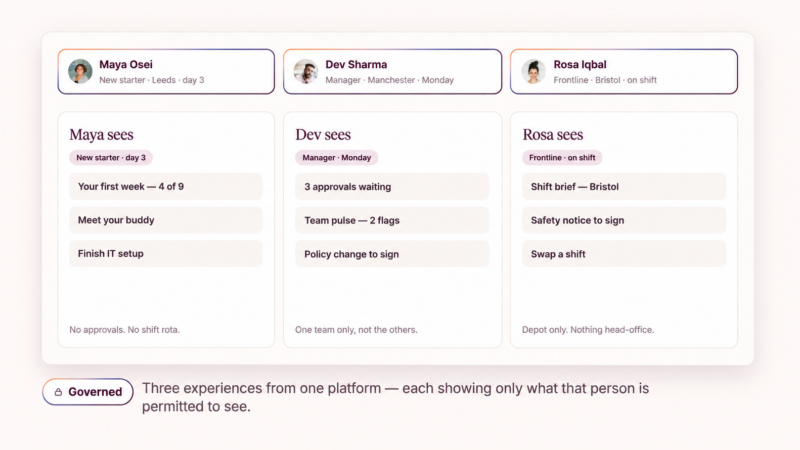
Here’s the uncomfortable reality: when your intranet publishes everything to everyone, it becomes white noise. Your HR team doesn’t need engineering updates. Your warehouse staff don’t need finance policy changes. When employees repeatedly see content that doesn’t apply to them, they learn to tune out—and that habit is hard to break.
The fix requires targeted content delivery. Creating a personalised employee experience ensures employees see updates, resources, and news relevant to their role, location, and interests.
Interact’s employee experience platform surfaces content based on audience segments, so your internal communications reach the right people at the right time.
Signs this is your problem
- Low click-through rates despite high traffic to your homepage
- Employees reporting, they “can’t find anything useful”
- The same small group engaging while others stay silent
What to do about it
Audit your content against your audience segments. Tag posts by role, department, and location.
Then measure whether engagement patterns shift when people see fewer, more relevant updates rather than everything at once.
2. Search and navigation do not work
Your employees aren’t going to spend fifteen minutes hunting for a policy document. According to Coveo’s 2022 Workplace Relevance Report, employees spent an average of 3.6 hours each day searching for information at work. If your intranet can’t surface the right answer quickly, people will default to asking a colleague—or simply guess.
Poor information architecture compounds this problem. When navigation menus reflect how your organisation thinks rather than how employees work, finding anything becomes a treasure hunt.
With AI-powered search becoming more common in the workplace, employees increasingly expect to find answers quickly rather than navigate multiple pages or search through lengthy documents. However, AI-powered search is only as useful as the information it can access.
Poorly organised, outdated, or inconsistent content can still make it difficult for employees to find reliable answers.
Signs this is your problem
- High bounce rates on search result pages
- Repeated questions in chat channels about things that exist on the intranet
- Employees bookmarking pages because they can’t trust search to find them again
What to do about it
Review your most common search queries. If people are searching for terms that don’t return relevant results, you have a metadata problem. Modern AI-powered enterprise search—like the capability Interact offers—learns from user behaviour to surface more accurate results over time.
3. Leaders aren’t visibly using it
Leadership plays an important role in employee engagement. According to Gallup’s 2026 research, managers account for 70% of the variance in team-level employee engagement, highlighting the significant influence leaders have on how employees connect with their organisation.
Leadership visibility isn’t just about posting announcements. It means engaging with comments, sharing updates directly on the platform, and referencing intranet content in meetings. When your CEO mentions a post from the intranet during an all-hands call, that signals to everyone that the platform matters.
Signs this is your problem
- Leadership communications arrive via email rather than the intranet
- Executives have incomplete or never-updated profiles
- Town hall Q&A sessions happen in email threads instead of the intranet
What to do about it
Start small. Have one senior leader post a weekly update directly on the intranet. Track whether engagement increases when leadership content is visible. Then build from there.
4. Information is outdated
Nothing destroys trust faster than finding the wrong answer. When employees discover that the policy they followed was last updated three years ago, or that the contact listed for IT support left the company, they stop trusting anything on the intranet.
Content decay is natural—what separates high-performing intranets from abandoned ones is whether anyone notices and acts on it. This requires clear ownership and regular content audits.
As organisations increasingly introduce AI-powered workplace search and assistants, outdated intranet content presents an additional challenge. When AI tools retrieve information from inaccurate or poorly maintained sources, they risk delivering answers that are no longer correct, potentially spreading confusion rather than reducing it.
Clear content ownership, consistent structures, and regular reviews are therefore essential for maintaining information employees can trust, whether they’re searching manually or using AI-powered tools.
Signs this is your problem
- High-traffic pages with publication dates from years ago
- Multiple versions of the same document scattered across the platform
- Employees double-checking intranet information with colleagues before acting on it
What to do about it
Assign content owners for each section of your intranet. Set review cycles—quarterly for policies, monthly for directories, and annual audits for everything else. Platforms like Interact can automate content review reminders so pages don’t quietly go stale.
5. It doesn’t work on mobile
If your intranet requires a desktop computer and a VPN connection, you’ve excluded a significant portion of your workforce. Frontline employees—those in warehouses, retail floors, manufacturing plants, and field roles—often don’t have desk access during their shifts.
Employees expect workplace technology to be intuitive and accessible. When an intranet is difficult to navigate on mobile devices, frontline workers may struggle to access important updates and resources during their working day. A mobile experience that is slow, complicated, or difficult to use can quickly discourage employees from engaging with the platform.
Signs this is your problem
- Engagement data shows activity only during business hours from office locations
- Frontline managers create shadow communication channels using WhatsApp or text
- Mobile users report the intranet is “too slow” or “doesn’t load properly”
What to do about it
Evaluate your mobile experience honestly. Can a warehouse worker clock in, check their schedule, and read a safety update in under a minute? Interact’s frontline employee app delivers instant access to resources, updates, and secure chat so teams stay aligned on every shift.
6. There’s no clear value for daily work
If employees can’t figure out how your intranet makes their job easier or faster, they’ll stick with the tools they already know. Email and messaging apps might be messy, but at least people understand how to use them effectively.
The challenge is compounded by constant digital interruptions. Microsoft’s 2025 Work Trend Index found that employees were interrupted by meetings, emails or messages approximately every two minutes during core working hours.
The path of least resistance is powerful. Every additional click, every extra login, every confusing navigation choice pushes employees back toward old habits. Your intranet needs to remove steps from their day, not add them.
Signs this is your problem
- Employees describe the intranet as “just another thing to check”
- Critical workflows still happen in email because “it’s easier”
- New hires stop using the intranet within weeks of onboarding
What to do about it
Identify three tasks employees complete regularly, such as finding HR policies, requesting IT support, or accessing important documents. Assess how many steps each task requires and where employees encounter unnecessary friction.
Look for opportunities to connect these workflows through your intranet, reducing the need to switch between platforms. Interact’s integrations with workplace tools can help bring information and everyday tasks together, making it easier for employees to access what they need without disrupting their workflows.
7. Employees don’t see their feedback making a difference
Intranets often include feedback mechanisms—comment sections, surveys, idea boxes. But if employees submit suggestions and never hear what happened to them, they stop contributing.
This creates a one-way broadcast system rather than a genuine workplace community.
Two-way communication requires visible follow-through. When someone suggests an improvement and sees it implemented (or receives a clear explanation of why it wasn’t), they’re far more likely to engage again.
Signs this is your problem
- Comment sections are empty or dominated by the same few voices
- Pulse survey participation drops year over year
- Employees describe the intranet as “for management, not for us”
What to do about it
Close the loop publicly. When a suggestion leads to change, announce it. When it doesn’t, explain why. Interact’s surveys and ideas features capture sentiment and surface employee input so you can act with confidence on automated insights—and show employees their voices matter.
Comparison table: Common intranet adoption barriers and fixes
| Barrier | Impact | How Interact addresses it |
| Irrelevant content | Employees tune out and stop checking | Role-based personalisation targets content by function, location, and interests |
| Poor search | Time wasted, trust eroded | AI-powered enterprise search learns from user behaviour |
| No leadership presence | Platform feels optional | Executive communication tools encourage visible participation |
| Outdated information | Wrong decisions, double-checking | Automated content review reminders keep pages current |
| Mobile inaccessibility | Frontline workers excluded | Dedicated frontline app with instant access |
| No daily value | Platform adds friction | Integrations bring workflows into one place |
| Missing feedback loops | One-way communication | Ideas and surveys with visible follow-through |
How do you rebuild trust in your intranet?
Rebuilding intranet adoption after it’s declined is harder than getting it right the first time, but it’s absolutely possible. Start by acknowledging the current state honestly with your employees. If your platform has a reputation for being unhelpful, pretending otherwise won’t change behaviour.
- Focus on quick wins first: Fix the search results for your ten most common queries. Update the five pages with the highest traffic. Get one executive to post something genuinely useful. Each small improvement signals that things are changing.
- Measure and communicate progress: If search success rates improve, share that data. If engagement increases, celebrate it. When employees see evidence that the platform is getting better, they’re more willing to give it another chance.
What metrics should you track for intranet engagement?
Measuring intranet adoption goes beyond counting logins. High traffic to your homepage means nothing if employees leave immediately. The metrics that matter reveal whether your platform is actually helping people work.
Consider tracking:
- Search success rate: What percentage of searches result in clicks? A low rate suggests your search isn’t returning relevant results.
- Content engagement by segment: Are specific departments or locations disengaging? This identifies where targeted intervention is needed.
- Time to task completion: How long does it take to find a policy, submit a request, or locate a colleague? Shorter times indicate reduced friction.
- Repeat visits: Are employees returning regularly, or visiting once and never coming back?
- Two-way participation: Comments, reactions, and survey responses indicate genuine engagement rather than passive consumption.
Interact’s analytics dashboard tracks what’s working and what isn’t, giving internal communications teams the data they need to make informed decisions rather than guessing.
Why Interact helps organisations solve intranet adoption challenges
The patterns in this article show up consistently because they stem from the same root cause: intranets that were built for the organisation’s needs rather than the employee’s experience. Interact takes a different approach.
Interact’s AI-native employee experience platform addresses each adoption barrier directly. Role-based content targeting ensures relevance. AI-powered search reduces time spent hunting for information. Mobile-first design reaches frontline workers where they are. And built-in analytics reveal what’s working so you can keep improving.
For internal communications and employee experience leaders, Interact serves as a partner—not just a platform. When your employees can find what they need, feel heard, and see their leaders engaged, adoption follows naturally.
Ready to diagnose why your intranet isn’t delivering? Get in touch with Interact to see how a modern employee experience platform can re-engage your workforce and turn your digital workplace into the hub it was meant to be.
FAQs
What is intranet adoption?
Intranet adoption measures how actively employees use your organisation’s internal platform for daily work. Strong adoption means teams naturally turn to the intranet to find information, collaborate, and stay connected with company updates. Interact helps organisations achieve higher adoption by making content relevant and access easy.
Why do employees stop using the intranet?
Employees typically abandon intranets when content isn’t relevant to their role, search doesn’t work well, information is outdated, or the platform doesn’t integrate with their daily workflows. Interact addresses these issues through personalisation, AI search, and integrations with tools employees already use.
How can leadership improve intranet engagement?
Leadership visibility drives adoption. When executives post updates directly on the intranet, engage with comments, and reference platform content in meetings, employees recognise that the intranet matters. Interact’s communication tools make it easy for leaders to participate visibly and authentically.
How long does it take to improve intranet adoption?
Quick wins like fixing search results and updating stale content can show results in weeks. Broader cultural shifts—like establishing leadership presence and rebuilding trust—typically take three to six months of consistent effort. Interact’s analytics help you track progress and adjust your approach as you go.
What makes Interact different from other intranet platforms?
Interact combines AI-native capabilities with a focus on employee experience. Features like AI-powered search, automated content recommendations, frontline mobile access, and agentic AI for sentiment analysis address the root causes of adoption failure rather than just the symptoms. This means your platform works for your people, not the other way around.
How can AI improve intranet adoption?
AI-powered intranet capabilities can help employees find relevant information more quickly, reduce time spent searching, and provide answers based on trusted workplace content. However, successful adoption also depends on accurate information, intuitive navigation, and employees trusting the answers they receive.
Why is intranet content quality important for AI search?
AI-powered search relies on the information it can access. When intranet content is outdated, duplicated, or poorly organised, AI-generated answers may be inaccurate or irrelevant. Clear content ownership, regular reviews, and effective governance help ensure employees receive more reliable information.
You Might Also Like
 Blog
Blog An AI-powered intranet that moves from personalized to adaptive
An AI-powered intranet should make your day simpler and faster. Simple. Most workplace AI, however, has done the opposite: more tools, more messages, more…

 Blog
Blog Workplace AI: From what employers want to what employees need
Workplace AI can look successful on paper and even deliver business improvements while still falling short of what employees actually need. An AI-enabled intranet…

 Blog
Blog Twenty years at Interact: Two decades of intranet design and user experience
I joined Interact in March 2007 with no real experience of intranets, intranet design, or intranet user experience. Twenty years on, it’s a decision…

 Blog
Blog What’s shaping internal comms in 2026/27: State of the Sector survey
Have your say in Gallagher’s State of the Sector survey How effectively does communication translate into what employees actually believe, experience, and do, and…