Model Context Protocol server for AI assistants and agents
Interact MCP: the intranet for people and agents.
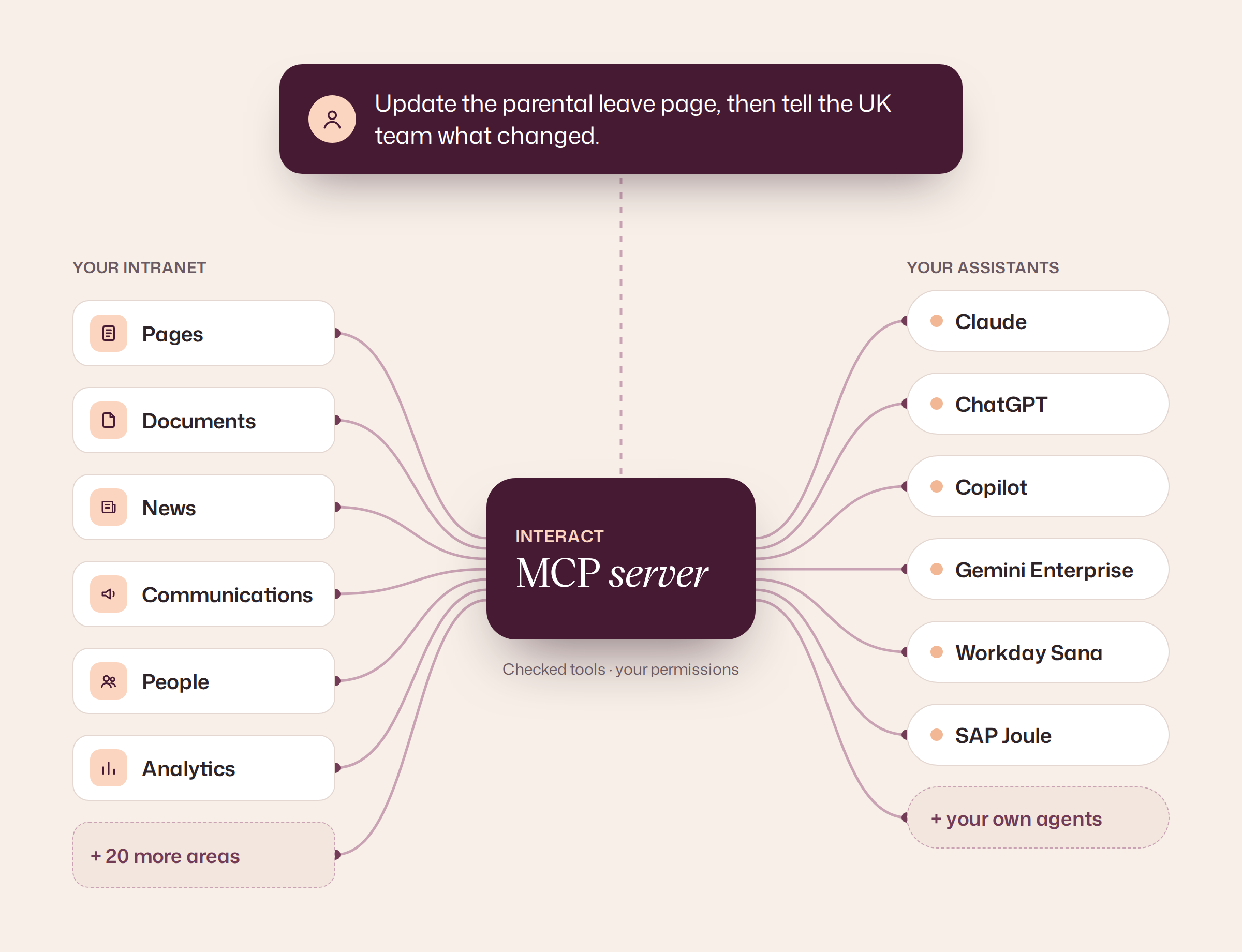
Your organization runs on more than documents. Give AI assistants access to the Interact tools behind your content, communications, communities, analytics and connected systems, with each person’s permissions intact.
Bring Interact into compatible AI environments including Claude, ChatGPT, Microsoft 365 Copilot, Gemini Enterprise, Workday Sana and SAP Joule.

What is Interact MCP?
Interact’s MCP server is a permission-aware connection between compatible AI assistants and the Interact employee experience platform. It uses the same tools that power Cue and Conductor, so assistants can do more than search: read documents, create and edit pages, work with communications, use analytics and access supported business systems.
Key capabilities of Interact MCP
Agents don’t stop at search. With the right permissions they can read attached documents, build and edit pages, prepare communications and pull analytics, all through Interact’s own checked tools.
- Search
- Documents
- Pages
- Communications
- Communities
- Analytics
People connect with your existing single sign-on. Every request runs as the signed-in person, so an assistant can only see and do what they already can in Interact.
- Single sign-on
- Conditional Access
- Role permissions
- Per-user tokens
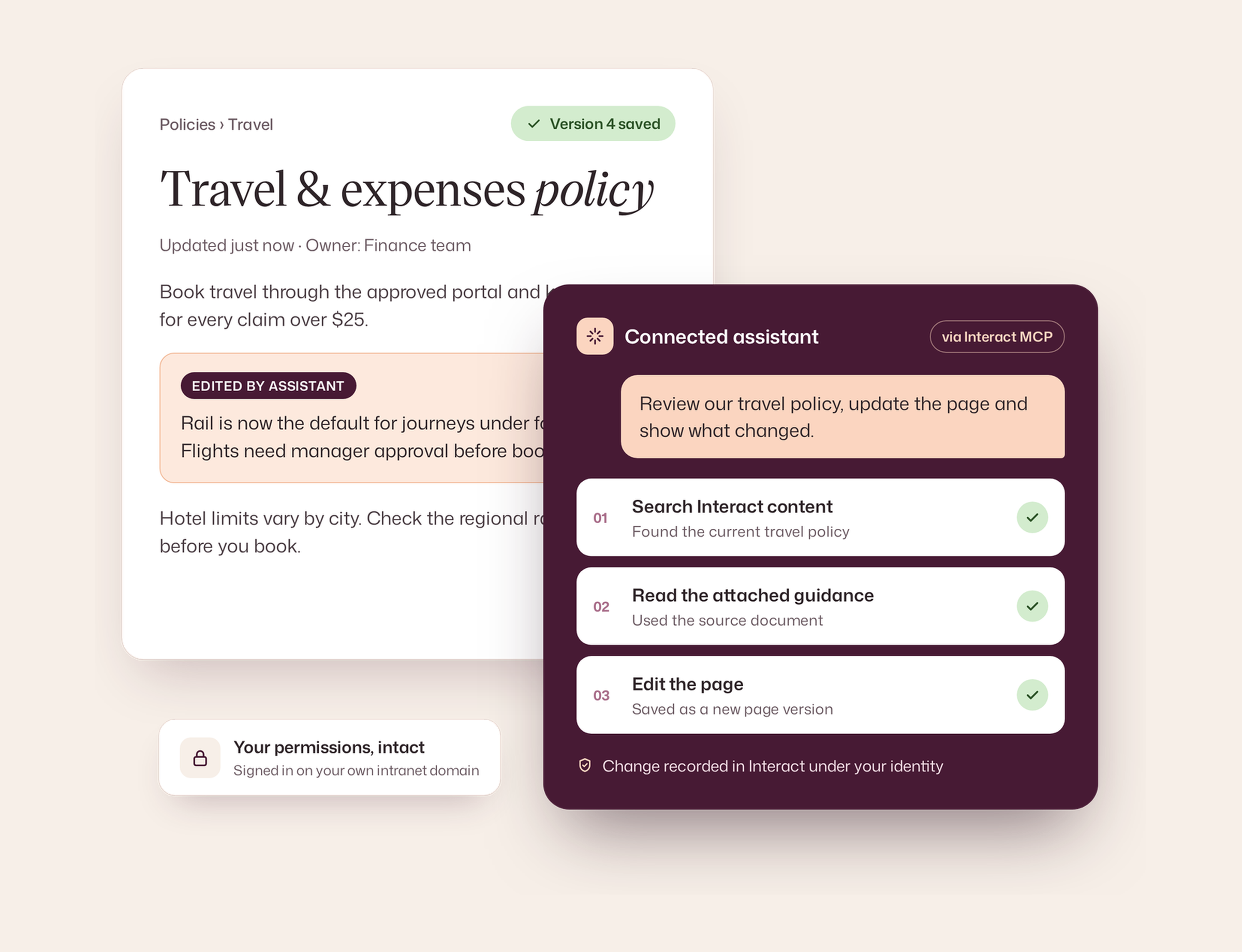
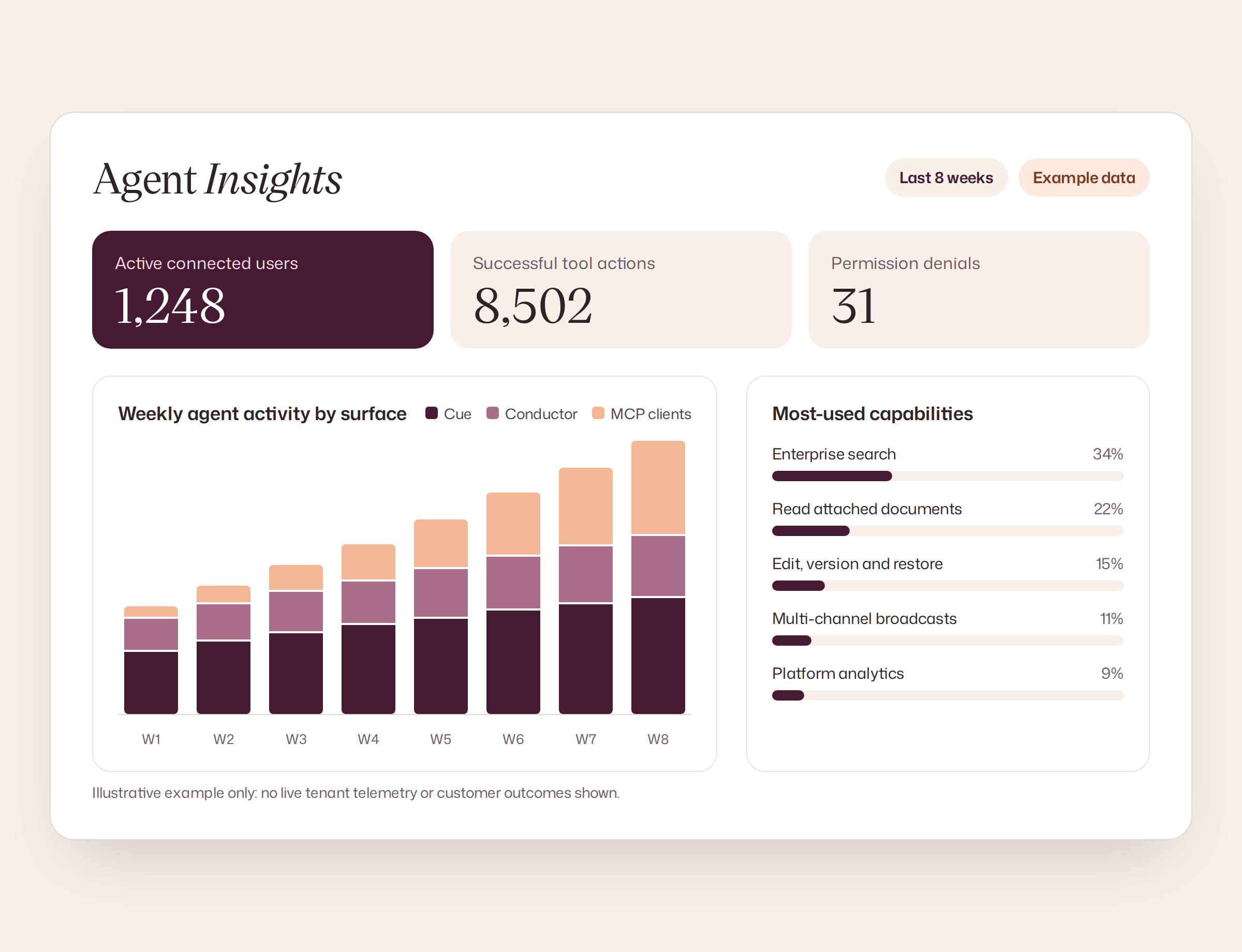
Changes go through Interact’s validation, land in version history and are attributed to the person who asked. Agent Insights shows what agents actually did.
- Validation
- Version history
- Audit trail
- Agent Insights
One standards-based server works with the assistants your people already use, and with the agents your teams build themselves.
- Claude
- ChatGPT
- Copilot
- Gemini
- Workday Sana
- SAP Joule
- Rovo
Built into the platform. Not bolted onto the chatbot.
Cue, Conductor and external agents all work from Interact’s underlying product capabilities.

Cue
The employee experience: relevant information, personal guidance and authorized actions in context.

Conductor
The operator: build, communicate, govern and analyze your employee experience through natural language.

MCP
The external-agent interface: use those same capabilities from approved AI assistants, with the signed-in person’s access.
Shared, checked tools. All three run on one Interact platform: pages, documents, news, audiences, channels, communities, surveys, recognition, tasks, analytics, governance and integrations. They share the same identity and permissions, business rules, approval controls, version history and platform APIs.
Not just answers. Actions.
This is the difference between an assistant that points people toward work and one that can perform supported parts of it.
Employee: find the right answer
“Can I accept a gift from this supplier? Use the policy documents and link the sources.”
Interact tools: search pages, read attached policy files and return source links.
Internal comms: make a useful change
“Draft the new parental leave page, then update the approved wording.”
Interact tools: build a page, edit blocks and preserve the approved change in page history.
Platform owner: find where to act
“Show adoption trends and identify which regions need more attention.”
Interact tools: read analytics, compare audiences and report limitations rather than guessing.
An entire intranet’s worth of things to do.
Explore 700 capabilities across 26 areas and counting, each designed for AI agents working through Interact’s MCP server, not a thin wrapper over our API.
Read and write, across the whole intranet. Many intranet MCP servers are read-only or cover a few content types. Interact’s lets agents search, create, edit and act across 26 areas, from pages and communications to recognition, analytics and connected systems.
Enterprise search
Search intranet pages, news, policies, people and documents. Extend the same query into connected SharePoint, Google Drive, Confluence and Box sources where configured.
“Find the latest UK expenses policy and show its source.”
Access: Read
Read attached documents
Open the actual contents of files attached to Interact pages, not just their filenames or metadata, and return answers with links back to the source.
“What does the attached gifts policy say about supplier vouchers?”
Access: Read
Document libraries and media
Find permitted files and media records in the intranet library and work with available library metadata, alongside full-content reading for supported attachments.
“Find the final benefits policy PDF in the document library.”
Access: Read / write
Policy and how-to answers
Employees ask HR and IT questions in plain language and get answers from approved policies and guides, with links back to the source.
“How many days of parental leave do I get?”
Access: Read
Requests in connected systems
Raise or check IT and HR requests in configured systems such as ServiceNow, Jira or Workday, without leaving the intranet.
“Log a laptop issue and tell me the ticket number.”
Access: Connector-dependent
The right person, form or page
When a question needs a human, route people straight to the right owner, team, form or page instead of a general inbox.
“Who do I speak to about my pension?”
Access: Read
Create pages from a brief
Turn a plain-language brief into a structured intranet page or draft, using the page-building tools already available to Conductor.
“Draft a page explaining our updated parental leave policy.”
Access: Write
Edit, version and restore
Change page content at block level, compare earlier versions, revert where needed and keep the change in Interact’s normal history.
“Improve the introduction, but leave the policy wording intact.”
Access: Write
Translate and repurpose content
Use supported translation and bulk content operations; generate FAQs, quizzes and polls from existing pages when the role permits.
“Translate the launch article and generate a knowledge-check quiz.”
Access: Write
News, articles and sites
Create and manage supported news articles, blogs, sites, navigation and related publishing structures, not just the text inside a page.
“Create a news post for store managers and link it in the menu.”
Access: Write
Multi-channel broadcasts
Build communications across email, SMS, push notifications and banners. Inspect audience counts and use supported scheduling, series and withdrawal actions.
“Prepare an urgent change notice for managers in three regions.”
Access: Write
Email and newsletters
Prepare and manage branded newsletters and email communications using Interact’s targeting and sending capabilities, subject to role and approval.
“Draft Friday’s employee newsletter with the three top updates.”
Access: Write
Audiences and targeting
Work with permitted employee segments, groups, locations and organization structure to target communication accurately.
“Which employees belong to the North West retail manager segment?”
Access: Read / write
People and directory
Find colleagues, profiles, teams, organizational details and the right owner for an issue without searching several separate applications.
“Who owns our safety policy for distribution centers?”
Access: Read
Recognition and rewards
Give recognition, view supported recognition activity and work with rewards where the user has permission.
“Recognize Sam for helping with the rollout.”
Access: Read / write
Communities and social feed
Use the social feed, discussion spaces and forums; find conversations, join communities and perform permitted social actions.
“Find the discussion about the office move and summarize concerns.”
Access: Read / write
Chat channels and membership
Manage exposed chat channels and membership. Reading or sending messages currently depends on a connected Teams or Slack integration.
“Set up a launch channel and add the regional managers.”
Access: Write / connector
Events and calendars
List upcoming events, read details and manage supported event records for users with editorial permissions.
“What events are planned for our UK team next week?”
Access: Read / write
Tasks and sign-off
Use the existing task dashboard and page sign-off capabilities. Full frontline task workflows and forms are distinct roadmap areas, not part of this claim.
“Show my pending page acknowledgements.”
Access: Read / write
Governance and moderation
Review and manage permitted moderation, governance and policy-compliance actions through Interact’s checked tools.
“Find flagged discussion items requiring a moderator.”
Access: Write
Pulse surveys and ideas
Use available pulse-survey functions, idea campaigns and feedback-related actions to support employee listening and participation.
“Show the feedback from our recent pulse survey.”
Access: Read / write
Campaigns and journeys
Access exposed campaign and journey capabilities for authorized users. Scope depends on the feature and tenant configuration.
“Show the active onboarding journeys for new starters.”
Access: Read / write
Live-stream video
Use supported live-stream capabilities for permitted events; this is not a general video-library management interface.
“List the live streams available for the next all-hands.”
Access: Read / write
Digital signage
Work with supported digital-signage channels, playlists, templates, devices and reporting through Interact’s own platform capabilities.
“Which signage channels are scheduled for the reception screens?”
Access: Read / write
Platform analytics
Ask questions across Interact’s analytics reports, including adoption, engagement and communications performance, rather than exporting data for manual analysis.
“Where has monthly active usage declined and which groups are affected?”
Access: Read
Agent Insights
Measure adoption and execution across Cue, Conductor and MCP: tool success, permission denials, repeat use, and task outcomes only where they can be verified.
“How many page edits completed successfully through AI this month?”
Access: Read
Notifications and subscriptions
Find and manage supported notifications, follows and subscriptions, according to the signed-in person’s permissions.
“Follow the finance updates community and show unread notices.”
Access: Read / write
Connected business systems
Reach configured Marketplace systems including Workday, ServiceNow, Jira, Salesforce, Microsoft 365, Google Workspace, Teams and Slack through authorized Interact tools.
“Open the relevant Workday or ServiceNow action for this employee.”
Access: Connector-dependent
Platform settings
Work with selected platform settings, feature flags and integration configuration where exposed and authorized. Domains and identity-provider changes remain outside MCP scope.
“Which platform features are enabled for this tenant?”
Access: Admin
Works with the assistants your people already use.
Interact uses Model Context Protocol (MCP), an open standard for making tools and information available to AI applications. Choose the experience that fits your organization; we’ll help with the integration details.

Claude
Custom connector. Available on Claude Pro, Max, Team and Enterprise. On Team and Enterprise, an owner adds Interact once for the whole organization, and each person then connects with their own intranet sign-in. Claude can then search, read and act in Interact with that person’s permissions.
Claude connector documentation ↗

ChatGPT
Custom MCP app. On ChatGPT Business, Enterprise and Edu, admins can add Interact as a custom MCP app on ChatGPT web, including write actions (currently in beta) with confirmation before changes. Enterprise and Edu admins can also control access by role. Pro accounts can connect with read and fetch access only.
OpenAI’s custom MCP app guide ↗

Microsoft 365 Copilot
Federated MCP connector. Microsoft 365 admins can configure an MCP-backed federated connector for live intranet knowledge. Copilot Studio offers another route for task-specific action agents.
For Microsoft 365 organizations ↓

Gemini Enterprise
Custom MCP data store. Google Cloud admins can add a custom MCP server to Gemini Enterprise. Our team can advise on the best fit for your Google Workspace and Gemini deployment.
For Google Workspace organizations ↓

Workday Sana
Remote MCP connection. Sana admins can add Interact as a remote MCP server. Each person then signs in with their own Interact account, so Sana agents only reach what that person can.
Sana MCP integration guide ↗

SAP Joule
MCP server in Joule Studio. Agents built in Joule Studio can use Interact as an MCP server, registered through an SAP BTP destination. Our team can help you choose the right tools for your Joule agents.
SAP Joule Studio ↗

ServiceNow (Now Assist)
External MCP server in AI Agent Studio. With ServiceNow’s Model Context Protocol Client, admins can add Interact as an external MCP server, so Now Assist AI agents built in AI Agent Studio can use permitted Interact tools.
ServiceNow MCP Client documentation ↗

Slack (Slackbot)
MCP server in a Slack app. Slackbot uses the MCP servers that come with installed Slack apps. Once an app carrying Interact’s MCP server is approved in your workspace, people connect their own accounts and Slackbot can use the Interact tools they’re allowed to.
Slackbot MCP guide ↗

Atlassian Rovo
MCP server for Rovo agents. Atlassian admins can connect MCP servers in Administration so Rovo agents can use their skills alongside Jira and Confluence. Add Interact to bring intranet content and actions into Rovo.
Rovo MCP announcement ↗

Salesforce Agentforce
External MCP server in Agentforce. Salesforce admins register Interact in the Agentforce Registry and add its tools to an agent. With Salesforce’s per-user authentication, each employee signs in to Interact once as themselves, so Agentforce answers and actions follow their own Interact permissions.
Salesforce’s external MCP guide ↗
Your own agents and chatbots
Any MCP-compatible client. Built your own assistant? If it supports remote MCP with OAuth sign-in, it can connect to your Interact MCP endpoint and use the same permission-aware tools, scoped to each signed-in person.
Different AI platforms offer different ways to connect and take action. We’ll help you select the right approach and demonstrate the capabilities available in your environment.
Connect any MCP service to Conductor.
MCP works both ways with Interact. As well as bringing Interact into other assistants, Conductor can connect out to the MCP servers your organization already relies on, so third-party systems and homegrown tools work inside your intranet too.
Interact’s MCP catalog
Switch on ready-made connections from Interact’s MCP catalog. Admins decide which servers and tools are available.
Any OAuth-enabled MCP server
Add any remote MCP server that supports OAuth, whether it comes from a SaaS vendor or your own platform team. People sign in with their own account, so actions run with their access in that system.
Homegrown tools
Expose internal systems as MCP tools once, then use them in Conductor alongside Interact’s own capabilities, without a custom integration project.
Workday Sana
Agent-Ready Tools. Bring Workday HR and finance capabilities into your intranet. Conductor connects to Workday’s MCP tools through Workday’s Agent Gateway, so Workday’s own permissions, business rules and approvals still apply.
SAP Joule
SAP Integration Suite MCP Gateway. Bring SAP capabilities into your intranet. Your team exposes the SAP APIs it chooses as governed MCP tools, and Conductor uses them with each person’s own access.
Every connected tool runs in the user’s context. Conductor uses each person’s own identity and their permissions in every connected system, keeps your corporate governance policies in place, and leaves a full audit trail of every action.
Microsoft 365 or Google Workspace? Interact fits both.
For Microsoft 365 organizations
Keep Microsoft 365. Add the rest of your organization.
Interact brings the knowledge, communications and actions that live beyond Teams and SharePoint into Copilot, without asking people to learn a new AI tool.
Copilot Chat
A federated connector gives live, permission-aware answers from Interact. It starts with read-only tools, and nothing is copied into Microsoft Graph.
Copilot Studio
Build task-specific agents that use Interact tools when actions and workflow controls matter.
Inside Interact
Interact’s SharePoint, Microsoft 365 and Teams integrations keep working for Cue and Conductor.
How to set it up · 4 steps
- Choose the Microsoft experience. Start with federated retrieval in Copilot Chat; use a Copilot Studio agent when actions are the primary goal.
- Register the authentication. Use the approved Entra or OAuth method and Teams Developer Portal registration required by Microsoft.
- Add the Interact MCP endpoint. In the Microsoft 365 admin center, create a custom federated connector and supply your intranet MCP URL.
- Launch with a focused team. Start with priority use cases and expand with your IT team.

For Google Workspace organizations
A Google-first workplace, powered by Interact.
Interact connects Drive, Gmail, Calendar and Chat with intranet content, employee communications, communities and platform actions.
Gemini Enterprise
Add Interact as a custom MCP data store. Admins register the endpoint, set up OAuth and choose which actions to enable.
Inside Interact
Interact’s Google Workspace and Drive integrations bring connected knowledge to Cue, Conductor and other approved agents.
Custom agents on Google Cloud
Teams building their own agents with Google’s Agent Development Kit can add Interact as a remote MCP toolset, with each user signing in through OAuth.
How to set it up · 4 steps
- Choose the right Google AI experience. We’ll help you identify the best integration path for your environment.
- Create a custom MCP data store. In Gemini Enterprise, register the Interact MCP endpoint and required Google Cloud organization policies.
- Choose the tools to enable. Connect the right user’s identity. Google recommends no more than 100 enabled actions at a time, so during setup we help you select the Interact tools that match your priority use cases and keep you within that limit.
- Pilot cross-system use cases. Start with intranet policies and content, then test permitted actions and connected Google Workspace sources.
The assistant changes. Your permissions don’t.
Each connection runs as the signed-in person against their own Interact environment. The platform authorizes what they can see and do, checks sensitive changes and records supported updates. The AI provider adds its own controls and approval policies.
- Own-domain sign-in: OAuth through your intranet
- Permission-aware tools: existing account roles and entitlements
- Checked writes: native validation and version history
- Auditable operations: changes linked to the acting user
Agent Insights
See the work your agents actually do.
Agent Insights unifies usage across Cue, Conductor and MCP clients. Rather than declaring success because a tool was called, it distinguishes successful executions, blocked requests and business outcomes that Interact can independently verify.
- Track connection, activation and repeat use by surface.
- Understand which capabilities and business areas are used.
- Identify permission denials, failed calls and performance bottlenecks.
- Separate completed operations from verified task outcomes.
Connected doesn’t mean unrestricted.
AI clients don’t receive new Interact privileges. You stay in control of who connects, which tools they may use and the permissions attached to every operation.
Identity
Employees connect as themselves on the company intranet domain using their normal sign-in flow.
Entitlements
Employee-level tools are available to people with Cue. Publishing and operational tools require applicable Conductor access and role permissions.
Approval
External clients can require confirmation for writes. Interact’s own checked tools still validate supported changes.
Data boundaries
External providers process prompts and tool results under their own terms. Each organization should complete an appropriate security review.
Admin controls. People only see the tools your organization has enabled. API access can be switched off for each intranet, and impersonated sessions can’t connect. See how Interact keeps your data secure →
FAQs
What is the Interact MCP server?
Interact’s Model Context Protocol (MCP) server lets compatible AI assistants securely use approved Interact intranet data and actions. It exposes the same permission-aware tools that power Cue and Conductor, backed by Interact’s core content, communications, communities, analytics and integrations.
Which AI assistants can connect to Interact?
Compatible remote-MCP clients include Claude and supported ChatGPT workspaces. Microsoft 365 Copilot can use an MCP-backed federated connector, with Copilot Studio as an additional agent route, and Gemini Enterprise can connect a custom MCP server. Workday Sana, Salesforce Agentforce agents, ServiceNow Now Assist agents built in AI Agent Studio, Slackbot (through a Slack app), Atlassian Rovo agents and agents built in SAP Joule Studio can also use Interact as an MCP server, as can your own agents and chatbots if they support remote MCP with OAuth sign-in. Our team can help you plan the right setup for your chosen assistant.
Does Interact work with Microsoft 365 Copilot?
Microsoft 365 Copilot supports custom federated connectors backed by remote MCP servers, administered through the Microsoft 365 admin center. The documented custom-connector setup starts with read-only tools; additional write capabilities depend on the Microsoft experience, rollout and integration testing. Copilot Studio can be used for action-oriented agents.
Can Google Workspace customers use Interact with Gemini?
Yes. An organization using Google Workspace can use Interact alongside Google services and can evaluate a custom MCP data store in Gemini Enterprise, which is the recommended route for agent access. Our team can help you choose the right integration for your Google Workspace environment.
Can ChatGPT create or edit content in Interact?
ChatGPT Business, Enterprise and Edu workspaces support custom MCP apps on ChatGPT web, including write actions, which OpenAI currently describes as beta. Admins enable and publish the app, and Interact operations stay limited by the signed-in person’s Cue or Conductor access and their normal permissions. Pro accounts can connect with read and fetch access only.
Can employees connect without a Conductor license?
Yes. Employees can connect through Cue, with no Conductor license needed, and use the employee-facing tools their account permits. More extensive publishing, governance and analytics capabilities come with Conductor access and the person’s role.
Does the agent gain administrator access?
No. The user signs in on their own Interact intranet domain, and tools run with that person’s existing authorizations. Dedicated write tools perform Interact-side checks, and changes such as page edits can be versioned and attributed to the user.
How does Interact MCP work with our identity provider and single sign-on?
People connect an AI assistant by signing in to your own Interact intranet, using the single sign-on it already uses with your identity provider, such as Microsoft Entra ID or Okta. Because sign-in runs through your identity provider, your existing policies still apply, including Conditional Access and multi-factor authentication. Every call then carries that person’s own token and runs with their normal Interact permissions, and impersonated sessions can’t connect.
Is this just another AI search connector?
No. Search and reading are only part of it. For authorized users, Interact’s tools can create and edit content, prepare communications, work with communities and recognition, use analytics and access configured business systems. Every action is scoped by the user’s rights and the AI client’s support.
Can Interact connect to other MCP servers?
Yes. MCP works both ways with Interact. Conductor can connect to servers from Interact’s MCP catalog or to any remote MCP server that supports OAuth, including tools your own teams build. People sign in to each service with their own account, so Conductor only acts with the access they already have there.
How is MCP different from A2A, and does it matter?
They solve different problems and work well together. MCP connects an AI agent to tools and data. A2A (Agent2Agent), an open protocol started by Google and now hosted by the Linux Foundation, lets one agent hand a task to another agent. Many enterprise platforms use both: SAP, for example, connects outside agents to Joule over A2A and exposes SAP tools over MCP. For an intranet, MCP is the one that matters most, because it is how Claude, ChatGPT, Copilot, Gemini and the other assistants on this page reach Interact’s tools, with each person’s permissions applied.
Does the MCP server expose every Interact API endpoint?
No, and it isn’t an API wrapper. Interact MCP provides 700 capabilities designed specifically for AI agents, shaped around the tasks agents actually perform rather than mirroring raw API endpoints, with Interact’s permission checks built in. Sensitive writes use checked Interact tools, and arbitrary raw writes that duplicate a dedicated tool aren’t allowed.
What does an Interact MCP connection cost?
There is no separate Interact MCP connector fee for people with Cue or Conductor in the current packaging. Cue or Conductor licenses, the external AI product’s subscriptions and any connected-system requirements still apply.
How is agent activity measured?
Agent Insights measures connected-user activation, tool usage and outcomes across Cue, Conductor and external agents. It separates technical execution success from independently verifiable task completion and makes measurement gaps explicit.