
3 essential intranet AI capabilities every organization should expect


Intranet AI capabilities can look impressive in a demo. The real question is whether they still work in the real world, when employees have different permissions, when policies vary by location, and when reliable information simply doesn’t exist.
Interact’s Senior Content Marketing Executive Sophie Hamblett examines three non-negotiables our new guide on AI must-haves lays out: protecting permissions, acknowledging knowledge gaps, and adapting answers to the employee asking.
Summary: Three intranet AI capabilities matter most: enforcing existing permissions so restricted content stays restricted, admitting when reliable information isn’t available instead of inventing an answer, and adapting responses to each employee’s role, location, and contract type. Test all three with real content and multiple employee profiles before buying.
Why do intranet AI capabilities matter?
Intranet AI capabilities determine whether AI can make your digital workplace useful, relevant, and trustworthy at scale. They shape the employee experience, and how effectively comms, HR, and IT can manage content, targeting, governance, and measurement. Interact’s Cue and Conductor illustrate the breadth of AI intranet capabilities, with Cue supporting EX and Conductor enabling the teams behind it.
For employees, AI can tailor what appears to their role, location, language, permissions, and current priorities. It can answer workplace questions, surface relevant tools and resources, and help them complete tasks.
Assessing AI intranet features means looking at performance across the employee experience and the work behind it. Organizations must understand whether the system recognizes the employee, uses appropriate content, respects permissions, supports safe action, and keeps people in control.
Essential #1: How should intranet AI capabilities protect restricted information?
Intranet AI should apply the same access controls that govern underlying content, regardless of how a question or search is phrased. Restricted information must remain restricted in answers, summaries, citations, and follow-ups. AI shouldn’t reveal what employees can’t access – in addition to not being able to read a confidential document, they shouldn’t know it exists in the first place.
Without safeguards, AI can give employees access to sensitive information even if they don’t go looking for it explicitly. The wrong question may lead to an AI response summarizing plans for another team, explaining an upcoming leadership decision, or even referencing a confidential strategy.
“Without safeguards, AI can give employees access to sensitive information even if they don’t go looking for it explicitly.”
To evaluate AI intranet permissions, use two accounts: one with access to a restricted document and one without. Ask the same direct question in each. Then approach the topic indirectly from the unrestricted account. Check the answer, citations, follow-ups, and related content. A passing result reveals no restricted details or revealing clues.
In addition, ask the vendor when AI intranet permissions are applied. IT and security stakeholders need to understand how access controls operate when AI retrieves, combines, and summarizes information. This is why enterprise intranet governance cannot sit separately from AI. Permissions need to travel with the content wherever and however it’s used.
Essential #2: What should intranet AI do when reliable information is unavailable?
Your intranet’s AI should tell employees when it cannot find enough reliable information to answer. It should avoid filling the gap with an invented-yet-plausible response, explain what is missing where possible, and direct the employee to a source or person who can help.
AI generation of confident, inaccurate responses has been identified by NIST, the US Department of Commerce agency focused on standards and technology, as “confabulation.” In its Generative Artificial Intelligence Profile , the agency named confabulation as one of the risks organizations must manage around generative AI.
In an intranet, false answers can appear especially credible because employees reasonably assume the system is drawing from approved organizational knowledge. Because employees may use these answers to make decisions about pay, leave, benefits, safety procedures, or compliance requirements, a misleading one could send them through the wrong process, cause a missed deadline, or weaken trust.
To test for confabulation, ask your intranet to answer questions about:
- A policy your organization doesn’t have
- A benefit offered in another country but not the employee’s location
- An internal system that doesn’t exist
A useful response should clearly state that the requested information could not be found or verified. Where appropriate, it should direct the employee to HR, IT, their manager, or another approved source.
Watch for invented answers softened with phrases such as “usually” or “in most organizations.” General guidance can still be dangerous when employees aren’t reviewing outputs carefully.
Essential #3: How should AI intranet features adapt to each employee’s context?
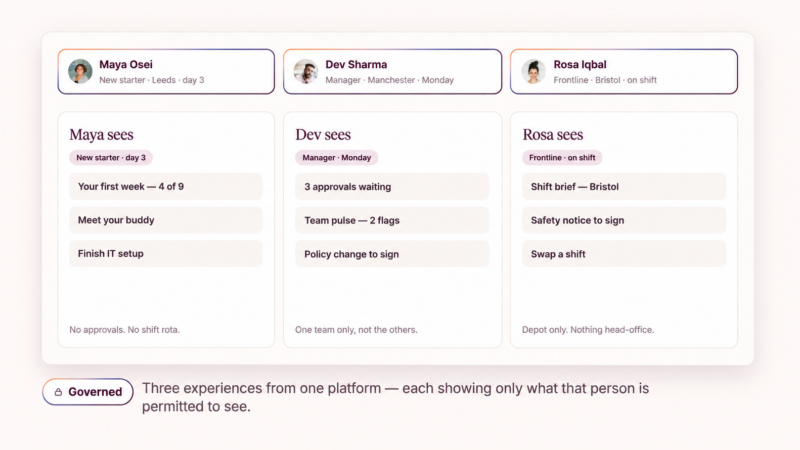
Intranet AI should use approved employee context, including role, location, contract type, language, and permissions, to return the answer that applies to that person. A response can be factually accurate at an organization-wide level and still be wrong for the employee who receives it.
“A personal, useful experience for everyone, from headquarters to the frontline, should now be the baseline.”
Simon Dance, Interact CEO
Questions such as “How much leave do I get?” may have different answers for employees in Boston and Berlin, in stores and headquarters, or depending on whether they’re permanent employees or contractors.

To test this, run the same questions through several realistic employee profiles. The response should change when the applicable policy, process, or entitlement changes based on employee context. It should remain consistent when that context makes no meaningful difference.
That personalization should rely on approved profile and organizational data. Employees shouldn’t have to explain their role, region, or employment status every time they ask a question, and personalization should never override their access permissions.
As Interact CEO Simon Dance put it, “A personal, useful experience for everyone, from headquarters to the frontline, should now be the baseline.” Delivering that experience requires more than adding someone’s name to a generic answer. The intranet must recognize which information applies to them. This capability is one part of a broader personalized employee experience in which content, tools, and guidance reflect what each person actually needs.
How can organizations evaluate AI intranet capabilities?
Organizations should evaluate these intranet AI capabilities with realistic scenarios, multiple employee profiles, and content from their own environment whenever possible. A rehearsed walkthrough from a vendor can show that a feature exists, but only a structured evaluation reveals whether it behaves correctly when the questions, permissions, or source material become more complicated.
Knowing how to evaluate an AI intranet requires a strategic test of each capability:
| Capability | Evaluation scenario | What a pass looks like | Red flags |
| Permission handling | Ask direct and indirect questions using accounts with different access levels | Restricted information, summaries, and citations remain inaccessible | The AI reveals details, implications, or links from restricted content |
| Knowledge limits | Ask about a nonexistent policy, benefit, or internal system | The AI acknowledges the gap and suggests an appropriate next step | It invents an answer or substitutes generic advice without explanation |
| Employee context | Ask the same question using profiles with different roles, locations, or contract types | The answer changes whenever the applicable information changes | Every profile receives the same generic response |
| Citations and retrieval | Ask questions that require pulling from more than one document, then check every cited source | Citations resolve to real, current pages that actually contain the claim being made | Citations are missing, broken, or point to content that does not support the answer |
| Content freshness | Ask about policies or processes that have recently been updated or retired from use | The answer reflects the current version and indicates when the source was last reviewed | The AI answers from a superseded version with no indication of the content’s age |
To make the evaluation more representative:
- Choose questions from actual search logs, service desk requests, or recurring HR queries.
- Include employees with meaningfully different permissions and profiles.
- Record the full answer, cited sources, and suggested next steps.
- Repeat important questions with slightly different wording.
- Ask the relevant content owner, security lead, or HR specialist to verify the result.
Score whether the system handled each situation correctly. Fluency and speed mean little if it exposes restricted information, invents a policy, or gives irrelevant guidance. A consistent process also shows stakeholders how to evaluate an AI intranet using evidence rather than impressions from a polished walkthrough.
What other intranet AI capabilities should organizations consider?
Beyond the three essentials covered here, organizations should evaluate whether AI improves the full intranet experience. That includes how employees discover information, receive personalized content, complete tasks, and act on priorities, as well as how internal communications, HR, and IT teams create, govern, target, maintain, and measure that experience.
For employees, valuable AI intranet features include experiences tailored to role, location, language, and priorities. AI can maintain context across a conversation, proactively surface important information, and support actions in connected workplace systems.
For the teams running the platform, AI can turn goals into coordinated plans, support content creation and targeting, identify outdated or duplicated information, resolve ownership gaps, stage changes for approval, and report on campaign effectiveness.
Your full evaluation should also examine retrieval, citations, content freshness, accessibility, integrations, proactive communication, and auditability. These are all important questions to ask intranet vendors when evaluating solutions. Together, these capabilities determine whether AI can adequately support the daily employee experience at your organization and the ongoing work required to manage it.
Test the capability, not the polish
A controlled walkthrough will always look good. That is what it is designed to do. The difference between a demo and a deployment shows up when the questions get messy: when the person asking sits outside the permission group, when the policy they are asking about does not exist in their country, when the correct answer depends on whether they are permanent or contract.
Test for those three situations using your own content and your own employee profiles. Ask the vendor when permissions are applied, what happens when no reliable source can be found, and which profile data drives personalization. Score the results rather than the presentation.
Our guide on intranet AI essential capabilities covers the full checklist. If you are ready to see how intranet AI capabilities behave outside a rehearsed demo, our people are waiting for your people to start the conversation.
FAQs
Why do intranet AI demos look better than real deployments?
Demos use curated content, a single admin-level account, and questions the vendor already knows the system can answer. Real deployments involve mixed permissions, policies that vary by country, and topics where no approved source exists. The gap shows up in how AI handles restricted content, missing information, and employees whose context differs from the demo profile.
What are the three essential intranet AI capabilities?
Permission handling, knowledge limits, and employee context. Permission handling means AI applies the same access controls as the underlying content across answers, citations, and follow-ups. Knowledge limits mean AI states when it cannot find a reliable source rather than inventing one. Employee context means answers reflect role, location, language, and contract type.
How do you test whether intranet AI respects permissions?
Use two accounts, one with access to a restricted document and one without. Ask the same direct question from each, then approach the topic indirectly from the unrestricted account. Check the answer, the citations, the follow-up suggestions, and the related content. A pass means no restricted detail and no clue that the document exists at all.
What should an intranet AI evaluation include?
Questions taken from real search logs, service desk tickets, and recurring HR queries. Several employee profiles with meaningfully different permissions, locations, and contract types. A record of the full answer, the cited sources, and the suggested next steps. Repeat the important questions with different wording, then ask the content owner, security lead, or HR specialist to verify each result.
What should organizations evaluate beyond these three intranet AI capabilities?
Retrieval quality, citation accuracy, content freshness, accessibility, integrations, proactive communication, and auditability. On the administration side, look at whether AI supports content creation, targeting, governance, and measurement for comms, HR, and IT teams. Together these determine whether AI improves the daily employee experience and the work of running it.
You Might Also Like
 News
News M&G’s Amp intranet shortlisted for Best Intranet at Gallagher’s 2026 awards
M&G’s intranet, Amp, built on the Interact platform, has been shortlisted for Best Intranet at Gallagher’s 2026 Communications and Digital Experience Awards. The shortlist…

 Blog
Blog 7 reasons employees ignore your intranet
Your intranet was designed to be the central hub for workplace communication. But as employees navigate growing volumes of information, multiple communication channels, and…
 Blog
Blog An AI-powered intranet that moves from personalized to adaptive
An AI-powered intranet should make your day simpler and faster. Simple. Most workplace AI, however, has done the opposite: more tools, more messages, more…

 Blog
Blog Workplace AI: From what employers want to what employees need
Workplace AI can look successful on paper and even deliver business improvements while still falling short of what employees actually need. An AI-enabled intranet…